Add Mermaid Diagrams
1 min read
This guide helps you add Mermaid diagrams to your Starlight documentation site using Sätteri.
Step-by-step Guide
Section titled “Step-by-step Guide”-
Install dependencies
Install
mermaid,satteri, and@astrojs/markdown-satteri:Terminal window npm add mermaid satteri @astrojs/markdown-satteriTerminal window pnpm add mermaid satteri @astrojs/markdown-satteriTerminal window yarn add mermaid satteri @astrojs/markdown-satteriTerminal window bun add mermaid satteri @astrojs/markdown-satteri -
Create the Sätteri Mermaid plugin
Save the following code as
src/plugins/satteri-mermaid.ts:src/plugins/satteri-mermaid.ts import { defineHastPlugin } from "satteri";export const satteriMermaid = defineHastPlugin({name: "mermaid",element: {filter: ["pre"],visit(node, ctx) {const codeChild = node.children?.find((c) => c.type === "element" && (c as any).tagName === "code",);if (!codeChild || codeChild.type !== "element") return;const lang = (codeChild as any).data?.lang;if (lang === "mermaid") {const text = ctx.textContent(codeChild);ctx.replaceNode(node, {type: "element",tagName: "div",properties: { className: ["mermaid"] },children: [{ type: "text", value: text }],} as any);}},},}); -
Configure Astro
Update your
astro.config.mjsto use the Sätteri processor with thesatteriMermaidplugin:astro.config.mjs import { satteri } from "@astrojs/markdown-satteri";import { defineConfig } from "astro/config";import starlight from "@astrojs/starlight";import { satteriMermaid } from "./src/plugins/satteri-mermaid";export default defineConfig({markdown: {syntaxHighlight: {type: "shiki",excludeLangs: ["mermaid"],},processor: satteri({hastPlugins: [satteriMermaid],}),},integrations: [starlight({customCss: ["./src/styles/mermaid.css"],}),],});
Example Usage
Section titled “Example Usage”Create a sample file like src/content/docs/example.mdx and include the following:
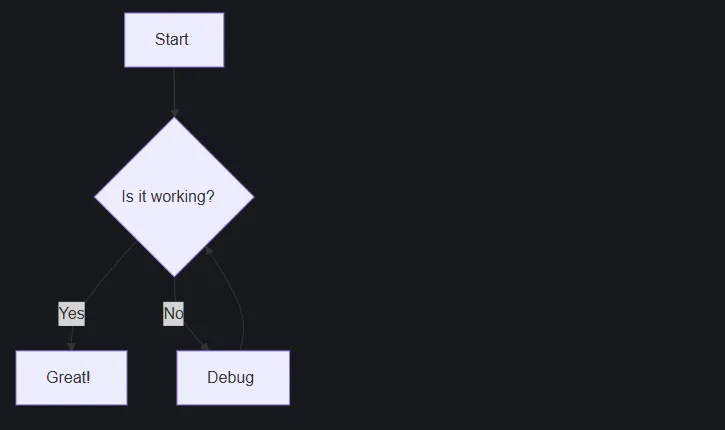
```mermaidgraph TD A[Start] --> B{Is it working?} B -->|Yes| C[Great!] B -->|No| D[Debug] D --> B```The diagram above will render like this: